Share and track
Know what happens after you share.
See who opened it, how long they read, how far they got and whether they came back, before you follow up.
Share a document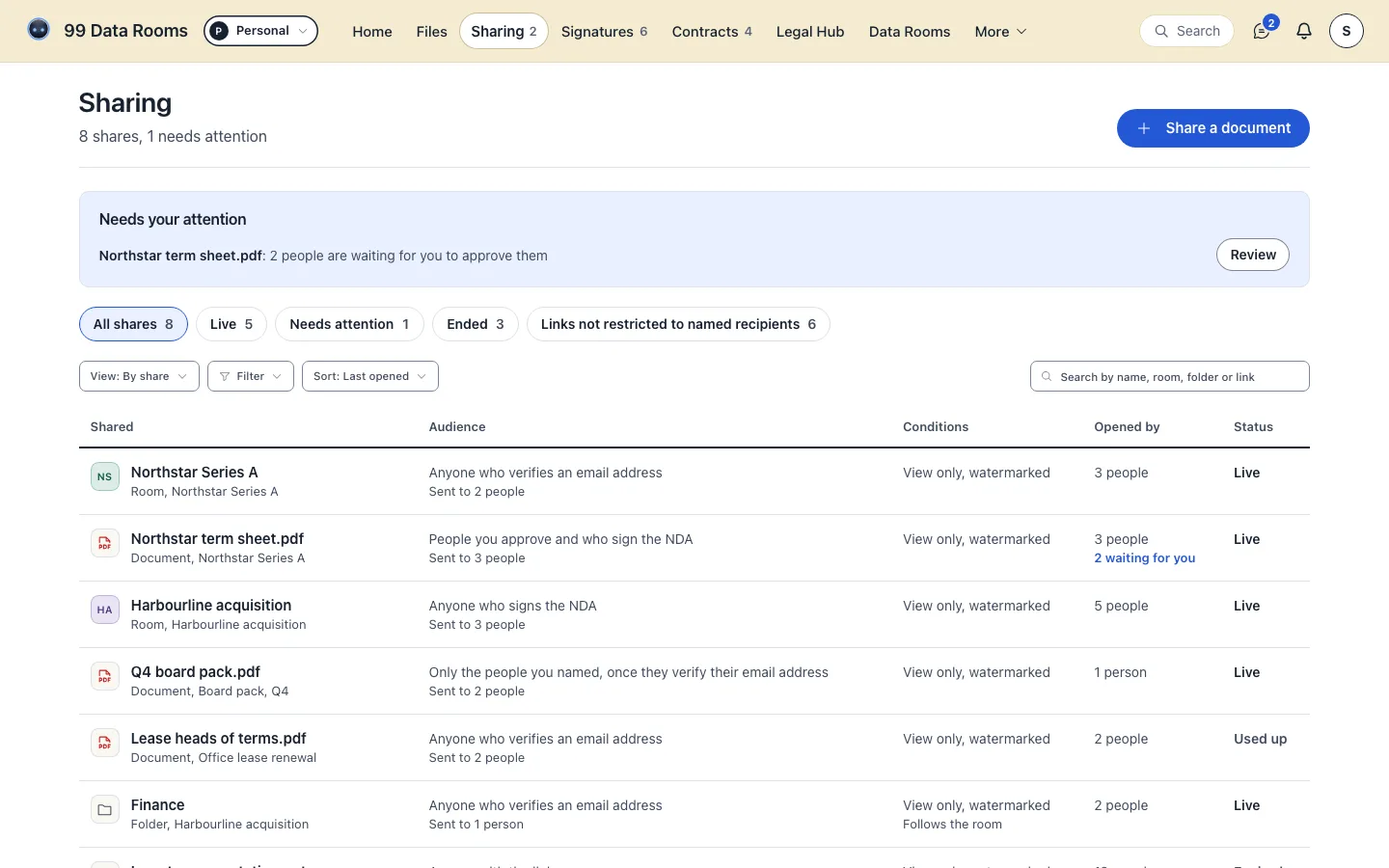
Sample data, from the app.
Pick the work in front of you.
Free forever: 3 rooms, 25 active links, no card required.
See who opened it, how long they read, how far they got and whether they came back, before you follow up.
Share a documentSample data, from the app.
Ask for a verified email, a passcode or a signed NDA before the first page, and switch a link off in one click.
Set up a shareSample data, from the app.
Pick from 116 templates, each drafted for its own legal system, answer a few plain-English questions and export the agreement.
Draft an agreement
Sample data, from the app.
Signers confirm a code we email them and sign in the order you set. You keep the signed PDF and a certificate with the document's fingerprint.
Send for signature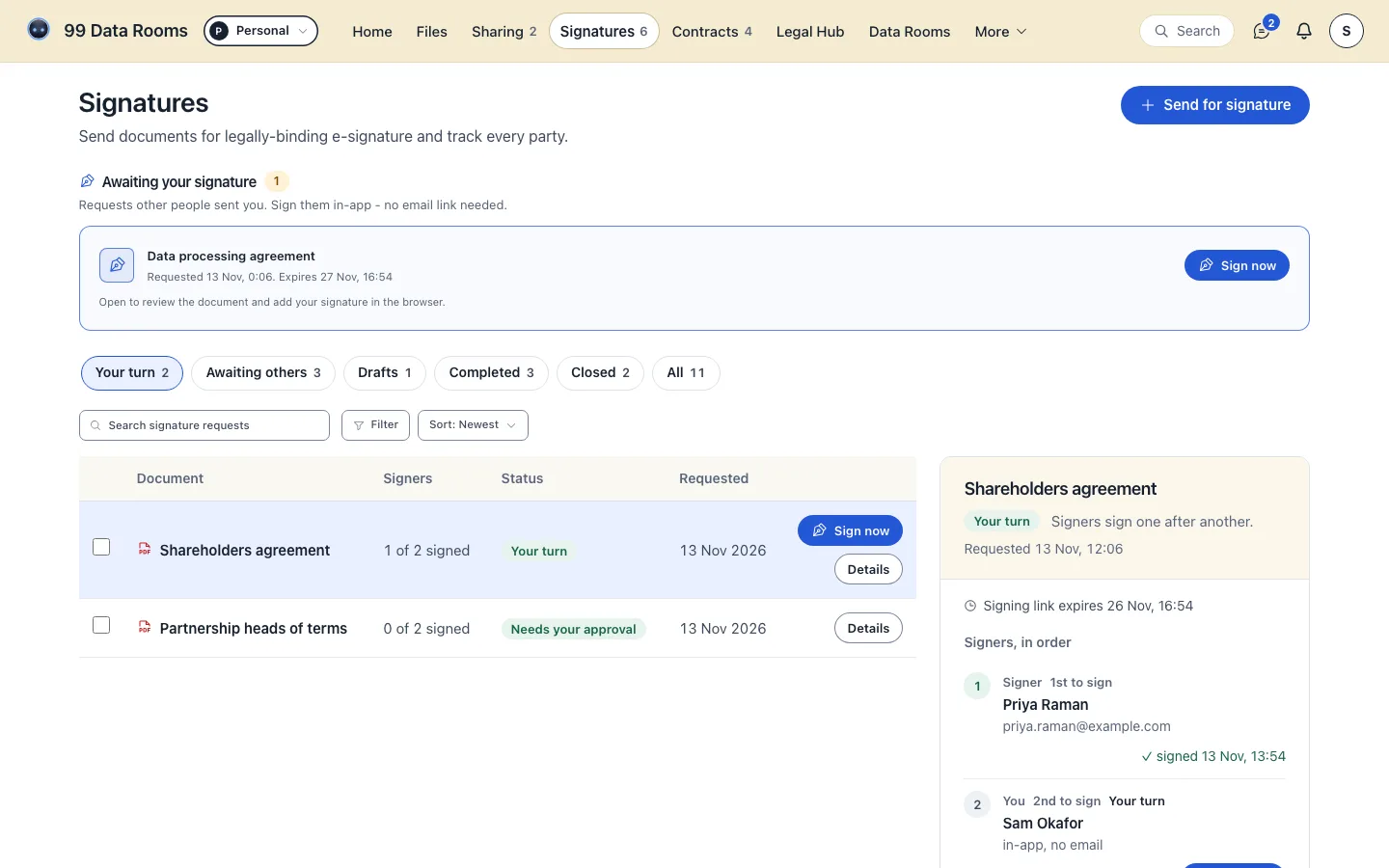
Sample data, from the app.
Bring contracts into one register and we email you before each one's end date: 30, 7 and 1 days ahead unless you choose otherwise.
Add contracts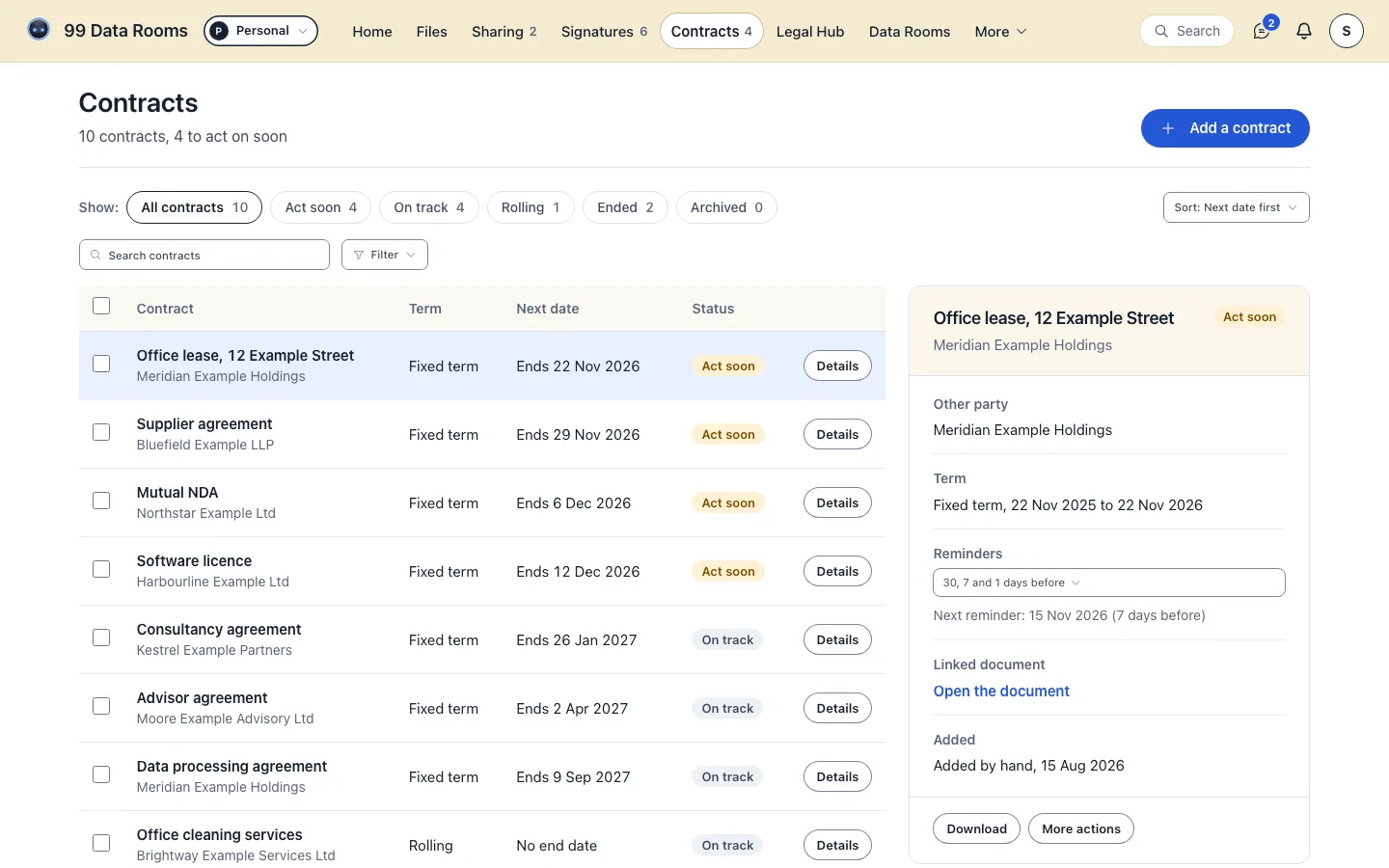
Sample data, from the app.
Bring documents together, manage access and answer the questions, then freeze the room at closing with a hashed index of everything in it.
Create a data room
Sample data, from the app.
Keep useful structure for the team with folders, tags, filters and bulk moves.
Organise files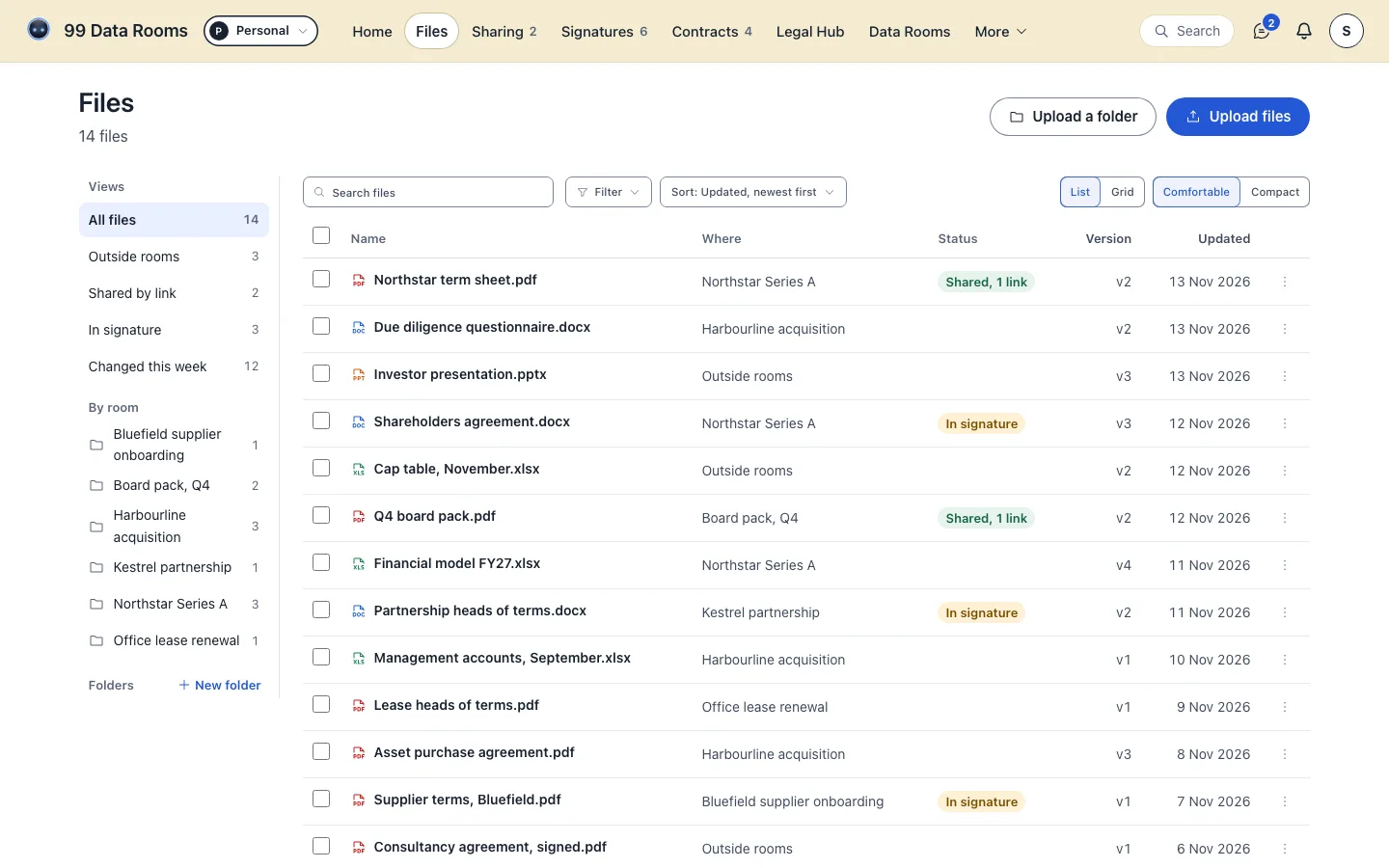
Sample data, from the app.
Questions arrive in one numbered inbox. Each answer goes only to the person who asked, unless you publish it to everyone on the link.
See Q&AFeatures
Data room features for sharing, tracking and e-signature. Sharing, gating, tracking, e-signature and AI Legal Drafting, walked through in full - what each feature does, how it works, and the exact tier that includes it. Where a feature has a limit, the limit is on this page too.
Follow the rail, or press a lens to jump to it
01Sharing
Turn any set of documents into a virtual data room: one organised, gated link instead of a stack of email attachments you can never take back.
Group the documents one audience needs into a single room, shared as one link. The Free plan includes 3 rooms and 25 active links, forever, no card required. Plus and above remove the room and link limits entirely. When the deal closes, freeze the room: no file or folder can be added, moved or removed until you unfreeze it, and every file is hashed with SHA-256. The index downloads as a CSV, so anyone can check later that the documents are exactly the ones that were there.
Require a viewer to confirm their email address and enter a one-time code before a room opens, so you know exactly who is looking without them ever needing an account.
Have each viewer sign your NDA before they can open the room, and keep a timestamped record of each signature - useful the moment a deal or disclosure needs a signed confidentiality step first.
Add a passcode on top of email verification, and set a link to expire automatically after a date or a number of views, so access does not quietly outlive the reason you shared it.
Revoke a link and every viewer on it loses access at once, even on pages they have already opened. Each link is revoked on its own, so one bidder's link can close while the others stay open - see the full approach on the security page.
02Insight
Email tells you a document was delivered. This tells you it was read: who opened the room, which pages they stayed on, how far they got, and how that compares to a casual visit. See the viewer analytics glossary entry for the full definition.
Free shows each viewer's visits: who opened it, when, from where and for how long. Plus and above break every view down page by page, so you can see exactly which section of a document someone actually read. Each document's figures export as a CSV file or a PDF report from its Activity tab.
A raw visit (a link opened, not yet identity-confirmed) is always shown separately from a verified viewer (email-confirmed), so your numbers are never inflated by a link forwarded around unopened. A visit becomes a verified viewer when the link verifies the viewer's email.
Time spent on each page, from Plus, so you can tell a thorough read from a quick skim before you follow up. Every plan already shows each visit's total time, the pages seen and completion.
See a room while it is being used, not just afterwards: a live count of viewers currently reading a shared document, and a named roster of which of your own team members are in the room right now.
Every Monday, a summary of the past seven days across your rooms - views, unique viewers and your most-opened links - with a one-click unsubscribe link in every email.
03Documents
Upload once, preview instantly, and keep the same link live even after you replace the file underneath it.
Upload Office documents directly - they are converted to a clean PDF preview automatically, no separate export step before sharing.
Every document opens in an in-browser preview, so a viewer never has to download a file just to read it.
Build the room out into folders and nest them as deep as the deal needs. Members see the structure, contributors can download documents and edit the room’s text documents, and a share link can target a single folder rather than the whole room, so one recipient gets one part of it. Rename, move and delete act on the folder you are standing in.
Right-click a document and choose Replace file: every live link serves the new version from its next open, with nothing to reissue (unless you shared a link pinned to one exact version, which keeps showing that version). Previous versions stay in your history, private by default, and you can choose per link whether its viewers may open earlier versions and see what changed. You can compare any two versions yourself, paragraph by paragraph.
Every document you share is watermarked by default: the viewer's email (or “Viewer” when the link collects no email), a visit code and the date and time in UTC, drawn into each PDF page and laid over other kinds, so a screenshot shows who it was issued to and when. You can relax it for one share.
Search the words inside your documents, not just their titles. Results come back as ranked snippets with the matching phrase highlighted, across your rooms and unfiled uploads alike.
Type to narrow a room by name, file type or the details under each document, filter it by type and by upload date, and sort it six ways, from your own room order to largest or most pages first. Then select several documents and move them into a folder in one step, or delete them together behind one undo for the whole batch. Tag documents with up to 10 labels of your own and filter by them; viewers and anyone you share with never see a tag.
04Signing
E-signature with an audit certificate (every value each signer entered, when they signed, their network location (privacy-protected) and intent-to-sign consent), from Plus. See the full definition in the electronic signature glossary entry.
Electronic signatures are valid for most commercial documents in England and Wales (Law Commission, Law Com No 386). General information, not legal advice.
Send a document for signature and get it back executed, with no separate signing tool to buy. Plus includes 5 signature requests a month, up to 2 signers; Pro and Business include unlimited e-signatures. A signer can ask you a question from the signing page before they sign, privately, and each question and answer is recorded in the audit trail.
Set a signing order, so the second signer only sees the request once the first has completed theirs. Plus covers two signers; Pro and Business add more parties per request.
Send a reminder to a signer who has not completed their part yet, throttled so nobody is reminded more than once in 24 hours. Nothing is chased automatically: you choose when to press Remind.
Every executed document carries an audit certificate recording the signer's network location (privacy-protected), intent-to-sign consent, timestamps, SHA-256 fingerprint, kept with the signed document for as long as you keep it.
05Drafting
Legal Drafting is a live product feature - it picks library clauses by ID from your answers and assembles the draft from a fixed clause library. Browse the source material in the template library.
Two ways to get a document. Templates: Pick one of our templates and fill it in. Every template is drafted from the law of its country. Blinky: Describe what you need in your own words. Blinky uses one of our templates when one fits; otherwise it drafts the document for you from scratch with AI, names its sources and marks each point as checked or not checked, so you know what to check yourself. Either way, have a lawyer review a draft before you rely on it.
Answer a short set of plain-English questions and get a complete draft assembled from library clauses, under any of the 9 legal systems the library covers. Our templates are assembled from a fixed clause library, from text prepared with AI from official sources or from official model documents whose published wording is kept, apart from the blanks and options you fill in. When Blinky drafts with AI, the draft names its sources. A point is marked Checked only when a second model has checked it against one of our own official sources; every other point is marked as not checked, and a website we could not verify as an authority is named as one. Read it through before you rely on it. Export the finished draft as a PDF, or on Pro and Business as an editable Word (.docx) file.
From NDAs and IP assignment to board resolutions, each drafted from the law of its country: 19 for England and Wales, and those for the UAE, Saudi Arabia and Egypt in Arabic and English. Browse them all in the template library.
Upload a contract, choose the law it is under and which side you are on, and get its points marked by how much each one matters to you. It has checklists for contracts under the law of the UK nations, Ireland, the EU, the United States, the UAE, the DIFC, the ADGM, Saudi Arabia and Egypt, and a general one for any other law. Export the review as a PDF or Word file, or save it to Files.
Ask Blinky a legal question and each point of law it checked shows the passage it read, so you can check it yourself; anything it could not verify is labelled as such. You can add up to five documents to a conversation.
Free includes Legal credits: 20 a month for drafts, contract reviews and Blinky's answers (up to 4 exports or sends, PDF), Plus includes Legal credits: 150 a month for drafts, contract reviews and Blinky's answers (up to 30 exports or sends, PDF), Pro includes Legal credits: 500 a month for drafts, contract reviews and Blinky's answers (up to 100 exports or sends, PDF + Word) andBusiness includes Legal credits: 1,200 a month for drafts, contract reviews and Blinky's answers, shared across the company (up to 240 exports or sends, PDF + Word). See the full breakdown on pricing.
Keep executed contracts in one register with their end dates. As an expiry approaches you are reminded in-app and by email at each milestone you choose - 30, 7 and 1 day before by default, from a menu of 90, 60, 30, 14, 7 and 1 - and you can copy in up to five colleagues, so a renewal never arrives as a surprise.
06Collaboration
Bring colleagues into a room with the least access that does the job, and keep the team's working notes where recipients can never see them.
Add colleagues to a room as a viewer, viewer with download, contributor or admin, and narrow any of them to just the folders they need - they see those and nothing else, and the rest of the room is not there to be found. And when an adviser only needs one file, skip membership entirely: send a gated link to that single document.
Viewer questions land in one inbox with a reference number (Q-1, Q-2, ...), categories and open or answered states. An answer goes only to the person who asked unless you publish it to everyone on the link, and publishing shows you exactly what will be disclosed first. The whole log, or just the questions in your current view, exports to CSV or JSON for your deal record. The assignee is a note about who is holding the thread, not a routing rule.
Discuss a document with your team, anchored to the exact page - or, in a spreadsheet, the exact cell range - with resolve and reopen states. Comments are only ever visible to the room's owner and members; a recipient opening your link can never see them.
07Trust
Where your documents live and who is responsible for keeping them safe. Full detail on the security page.
Enrol an authenticator app and keep recovery codes for the day you lose it. Enforcement lives in the database, not just the login screen: once 2FA is on, a password-only session cannot read your documents at all - Postgres itself refuses, across more than 30 tables and file storage.
On by default for every share: the document blanks briefly on screenshot shortcuts, and printing, right-click, text selection, copying and browser translation are off in our viewer. On Pro and above a share can also be strict, blanking whenever the viewer switches away. It deters and attributes - a captured page shows who it was issued to - but no website can stop an operating-system screenshot or a screen recording, and no software can stop a phone camera pointed at a screen.
Start every new share in a room with viewer protection relaxed, for a room whose readers you trust. Each share's own setting shows it and can turn protection back on, and shares that already exist are not changed.
08Billing
One flat price per plan, never per seat or per viewer. Full tier-by-tier detail, FAQ and the annual-saving toggle live on pricing.
Bring the whole company under one account with unlimited seats. Billing scales on capacity - storage and Legal credits - never on headcount, and verified colleagues share the organisation's plan without paying per user. Organisations are Business only; Free, Plus and Pro are one account each.
Top up your Legal credits without changing plan: one-time packs of 50, 125 or 250 credits. Pack credits last 24 months and are spent after your monthly allowance, the soonest to expire first.
Every capability, in detail
What it does, which tier it starts on, and how it behaves at the edges.
Features FAQ
Straight answers on tiers, hosting and what the drafter does.
3 rooms, 25 active links, forever, no card required. Free includes 20 Legal credits a month for drafting and contract review; e-signatures are available from Plus.
99 Data Rooms runs on SOC 2 Type II and ISO 27001 audited platforms from our infrastructure providers, Supabase and Cloudflare. Those reports are held by the providers named, and the full detail is on the security and trust pages.
Yes. Legal Drafting is a live feature. It picks library clauses by ID from your answers and assembles the draft from a fixed clause library.
Templates: Pick one of our templates and fill it in. Every template is drafted from the law of its country. Blinky: Describe what you need in your own words. Blinky uses one of our templates when one fits; otherwise it drafts the document for you from scratch with AI, names its sources and marks each point as checked or not checked, so you know what to check yourself. Either way, have a lawyer review a draft before you rely on it.
Electronic signatures are valid for most commercial documents in England and Wales (Law Commission, Law Com No 386). General information, not legal advice.
A raw visit is a link being opened, before any identity check. A verified viewer has confirmed their email (and, where required, a one-time code or a signed NDA). Analytics always show both, so open counts are never mistaken for confirmed reads.
Yes, on Pro and Business. They are converted automatically to a clean PDF preview, so viewers never need Microsoft Office installed to read them. Plain text and Markdown documents live inside a data room on every plan, and HTML documents on Pro and Business: open a room and add them there.
Right-click the document and choose Replace file. Every live link serves the new version from its next open, so nothing needs resending. A link you pinned to one exact version keeps showing that version. Previous versions are kept in your history, where you can reopen one or make it current again. That history is private by default, including on every link you have already sent; you can turn it on for a particular link if you want its viewers to see what changed.
Yes, on Pro and Business. Viewer questions arrive in one inbox with reference numbers, categories and open or answered states. An answer goes only to the person who asked unless you publish it to everyone on the link, and the whole log exports to CSV or JSON for your deal record.
Yes, two ways. A public, read-only MCP server lets any AI agent answer questions about the product from source. On Pro and Business, an authenticated MCP connection can also work inside your own rooms: it is off by default on every room, read-only unless you explicitly grant writes, fully logged and revocable at any time.
Each kind of data, and where it is stored, is listed on the Security page, with every provider in the sub-processor register. AES-256 at rest, TLS 1.2+ in transit, published DPA.
Want the full price list? See pricing, the plain-English glossary, or how teams use this for fundraising, M&A and legal work. Weighing tools against a specific alternative? See compare.
See it running on your own documents. Upload a PDF, send one link, and watch the page-by-page picture fill in. 3 rooms and 25 active links stay free forever, with no card.
Our prices on this page are UK prices in GBP and include VAT where it applies. Checkout shows the price for your country, and any tax added to it.